One Minute to Generate a Professional Financial Report (No App Needed)
Painless AI Lab – A Hong Kong Practitioner’s Real-World AI Journey (Part 9)
In my last post, I pulled back the curtain on the real-world headaches of building a custom AI application from scratch. After reading it, a few friends reached out with a great question: “If building a full app is too much work, is there a simpler way to automate things?”
The short answer is: Absolutely.
You don’t always need to build a complete software application to get professional results. Today, I want to share a much simpler workflow. How I generate structured, professional-looking financial reports in about 60 seconds using everyday AI tool?
Here is exactly how I do it, step-by-step.
The 4-Step “No-App” AI Workflow
- Choose Your Main AI Tool
For this workflow, I primarily rely on Google Gemini or Grok. A massive plus for local practitioners is that both of these platforms work seamlessly in Hong Kong without the need for a VPN, making them incredibly stable for daily business use.
- Set Up a Ready-to-Use System Prompt
Instead of typing out a long instruction every single time, I use built-in automation features to save my core template:
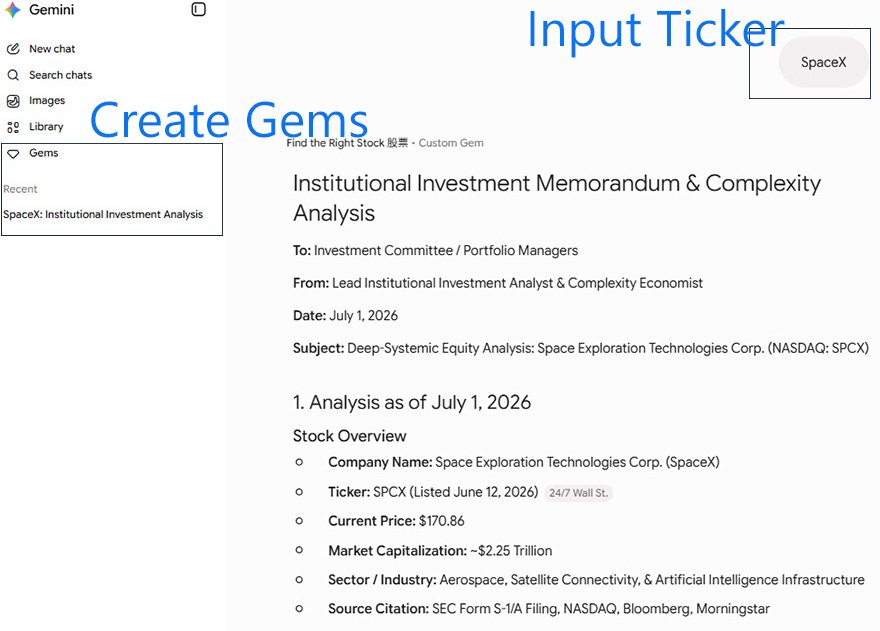
- On Gemini: Create a new “Gem” and paste in your well-refined financial analysis prompt.
- On Grok: Create a new “Project” and save your prompt there (you can also upload reference documents to guide its style).
Once this is done, your AI assistant is permanently trained on how you want your reports formatted.
- Source Your Data
While you can connect these tools to live financial APIs for advanced setups, you can keep it beautifully simple for daily checks. I often just pull free, up-to-date data from trusted sources like Yahoo Finance or Google Finance.
- Generate the Report
With the backbone set up, the execution is effortless. I simply type in a stock name or ticker (like Alphabet/Google or NVIDIA). Within seconds, the AI processes the raw financial data through my saved prompt and spits out a clean, structured, corporate-ready financial summary.
No coding, no deployment, and zero complicated infrastructure.
Why This Practical Approach Wins
If you want immediate efficiency gains without spending weeks on development, this is the sweet spot.
Because you are utilizing existing platforms, this method can cost you absolutely zero dollars. The secret sauce lies entirely in the quality of your system prompt. Once you take the time to refine that prompt to analyze numbers exactly how you like, you can reuse it indefinitely.
Of course, building a custom, dedicated app gives you deeper integration and total control over your data pipeline. But for independent professionals, analysts, or business owners looking for a quick win, this simple method is incredibly practical and powerful.
Join the Discussion
Have you started experimenting with custom “Gems” in Gemini or “Projects” in Grok to automate your repetitive tasks?
What kind of automated reports or market analysis would make your workday easier? Let’s swap ideas in the comments below!
Give it a try:
Simply open up Gemini or Grok right now to start testing your first prompt.